What the term means
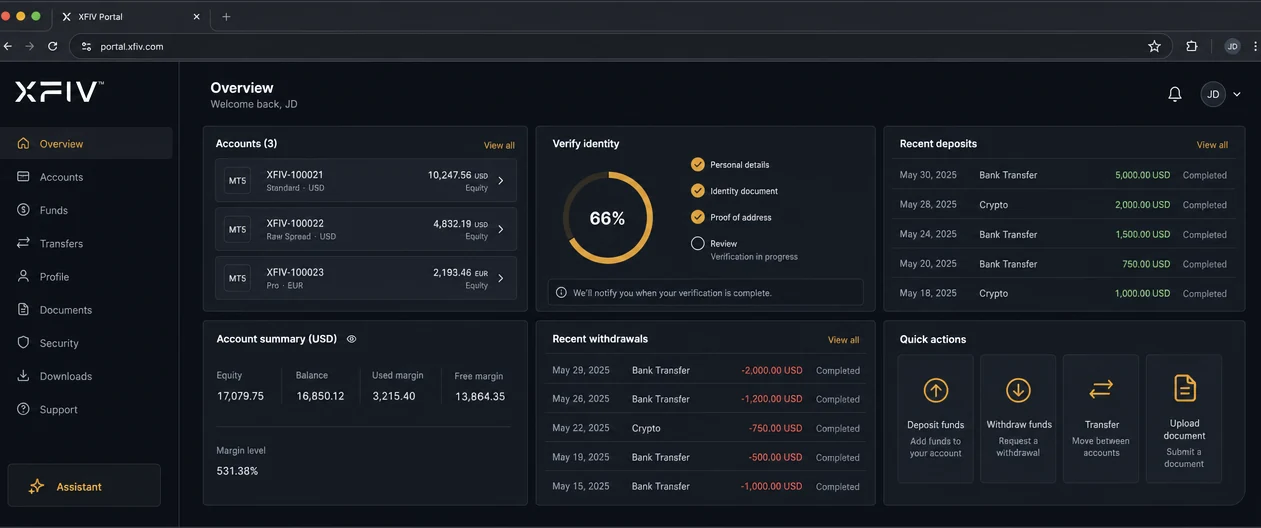
The client area goes by several names. Brokers call it a client portal, a trader’s room, a client cabinet or a personal area. The meaning is the same: the logged-in space where a client handles everything that is not trading itself.
“White-label” means the vendor’s brand is removed. The broker sets the logo, colours, domain, email templates and often the wording. To the client, the area looks like software the broker built in house.
“MT5” means the area is connected to a MetaTrader 5 server. It can create trading accounts, read balances and positions, and post balance operations when funds move.
How it works
A client area sits between the client, the broker’s back office and the MT5 server. A typical flow looks like this:
- The client registers with an email address and creates a profile.
- The client uploads identity and address documents, which the broker’s compliance team or a verification provider reviews.
- Once approved, the client requests an MT5 account. The client area calls the MT5 server through a server-side integration and returns the login details.
- The client submits a deposit through a payment provider. After confirmation, the system posts a balance operation to the MT5 account.
- The client trades in an MT5 terminal or a web terminal, then returns to the client area for history, statements and withdrawals.
The connection to MT5 runs on the server side, usually through the MetaQuotes Manager API or a service built on top of it. The client never talks to the MT5 server through the client area directly.
Key components
- Registration and login, ideally with two-factor authentication.
- Client profile and document upload with clear verification status.
- MT5 account management: open live and demo accounts, change leverage where allowed, reset passwords.
- Funding: deposit and withdrawal requests, internal transfers between accounts, payment provider integrations.
- Reporting: balances, equity, open positions, trade history and downloadable statements.
- Partner or introducing broker (IB) area, often separate, showing referrals and commissions.
- Support: messaging, ticketing or a chat assistant, with handoff to staff.
- Branding and localisation: logo, colours, domain, email templates and languages.
What to look for
Client areas differ most in the parts clients do not see. When you compare options, ask about these points:
- How the MT5 connection is built, and how errors from the server are shown to clients and staff.
- Whether every staff and system action is written to an audit log.
- Where the data is hosted, how it is encrypted and how backups are handled.
- How much of the branding you control, including the domain and transactional emails.
- Which languages are supported and who maintains the translations.
- Whether there is a sandbox or test environment before you go live.
- How the area exports data if you change vendors later.
For a full evaluation list, see the trader’s room checklist in our resources section.
Client area vs CRM
The client area is the client-facing side. The CRM or back office is the staff-facing side, where sales, compliance and finance teams review clients, approve documents and process payments. Many vendors sell both as one system. Others keep them separate and connect them through an API.
How XFIV relates
XFIV Portal is a white-label client portal for MT5 brokers. It includes a built-in AI agent that answers clients’ questions about their own accounts and hands the conversation to staff when needed. It connects to MT5 through XFIV Connect. See the XFIV Portal product page for details.
Frequently asked questions
Is a client area the same as a trader’s room?
Yes. Client area, client portal, trader’s room and client cabinet usually describe the same thing.
Do clients trade inside the client area?
Usually not. Clients trade in an MT5 terminal or a web terminal. Some client areas embed or link to a web terminal so the switch feels seamless.
What does white-label mean here?
The vendor’s branding is removed, and the broker’s logo, colours, domain and emails are used instead.
Does a client area replace a CRM?
No. The client area serves clients. The CRM or back office serves staff. They share data and are often sold together.