MCP for MT5 brokers

An MT5 MCP server, under broker control

XFIV Connect includes an MCP server for MT5 brokers. It lets approved AI assistants read client account data through the Model Context Protocol. Access is read-only by default, the broker sets the scopes, every request is written to an audit log and AI assistants cannot place trades.

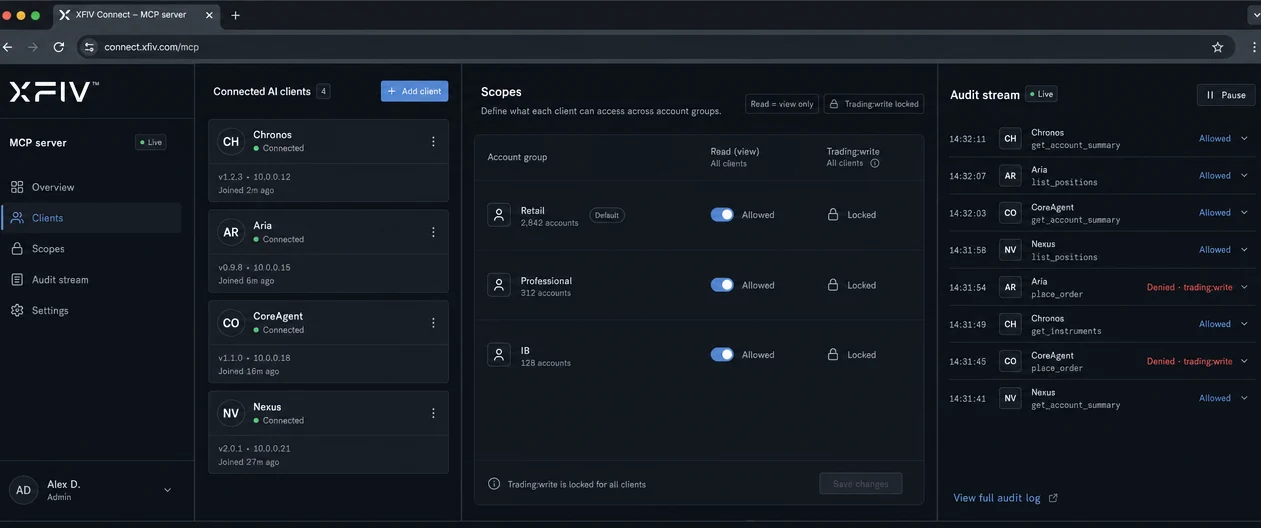
MCP permissions console in XFIV Connect with scopes for an AI assistant
Definition

What is MCP?

MCP, the Model Context Protocol, is an open standard for connecting AI assistants to software. Instead of building a custom integration for every assistant, a system exposes an MCP server. Any compatible assistant can then discover what the server offers and request data in a structured, predictable way.

An MCP server describes a set of tools and resources, such as "read account balance" or "list recent trades". The assistant decides which tool to call to answer a question, the server checks whether that call is allowed, and the result goes back to the assistant as structured data.

For trading, that means a client can ask an assistant "How did my account do this week?" and get an answer built from their real account data, rather than a generic reply. The open question for a broker is who controls that access, and how it is recorded.

For brokers

What an MT5 MCP server for brokers does

XFIV Connect already sits between your MT5 server and the systems around it. Its MCP layer exposes a controlled subset of that data to AI assistants. The assistant never talks to MT5 directly. It talks to XFIV Connect, which applies your rules before anything is returned.

Because the server runs on the broker side, it can cover every account a client holds with you, apply the same scopes across all of them and write every request to the same audit log your team already uses for the API. Your compliance and support teams can see what an assistant asked for and what it received.

MCP for Trading Platforms

With XFIV Connect, your clients can link their trading accounts to AI assistants through the Model Context Protocol. Access is read-only by default, scoped by the broker, and every request is logged for review.

Read the MCP guide
MCP
Open standard
Read-only
Default access
Scoped
Permissions set by the broker
Audit Log
Requests logged for review

MCP permissions

Connection

AI assistant (sample)
Account 5012 · via MCP
Active

Permissions

  • Account summaryAllowed
  • Trade historyAllowed
  • Place ordersDisabled
3

Audit log

10:42:07account.summaryallowed
10:42:09history.tradesallowed
10:43:15orders.placeblocked by scope
10:44:02account.summaryallowed

AI responses are informational and are not investment advice.

Read-only by default

Assistants read. They do not trade.

Out of the box, MCP access is read-only. Assistants can read balances, positions and history within their scopes. Order placement is not enabled for AI assistants.

  • No order placement through MCP
  • Read-only scopes as the default
  • Client data limited to the client’s own accounts
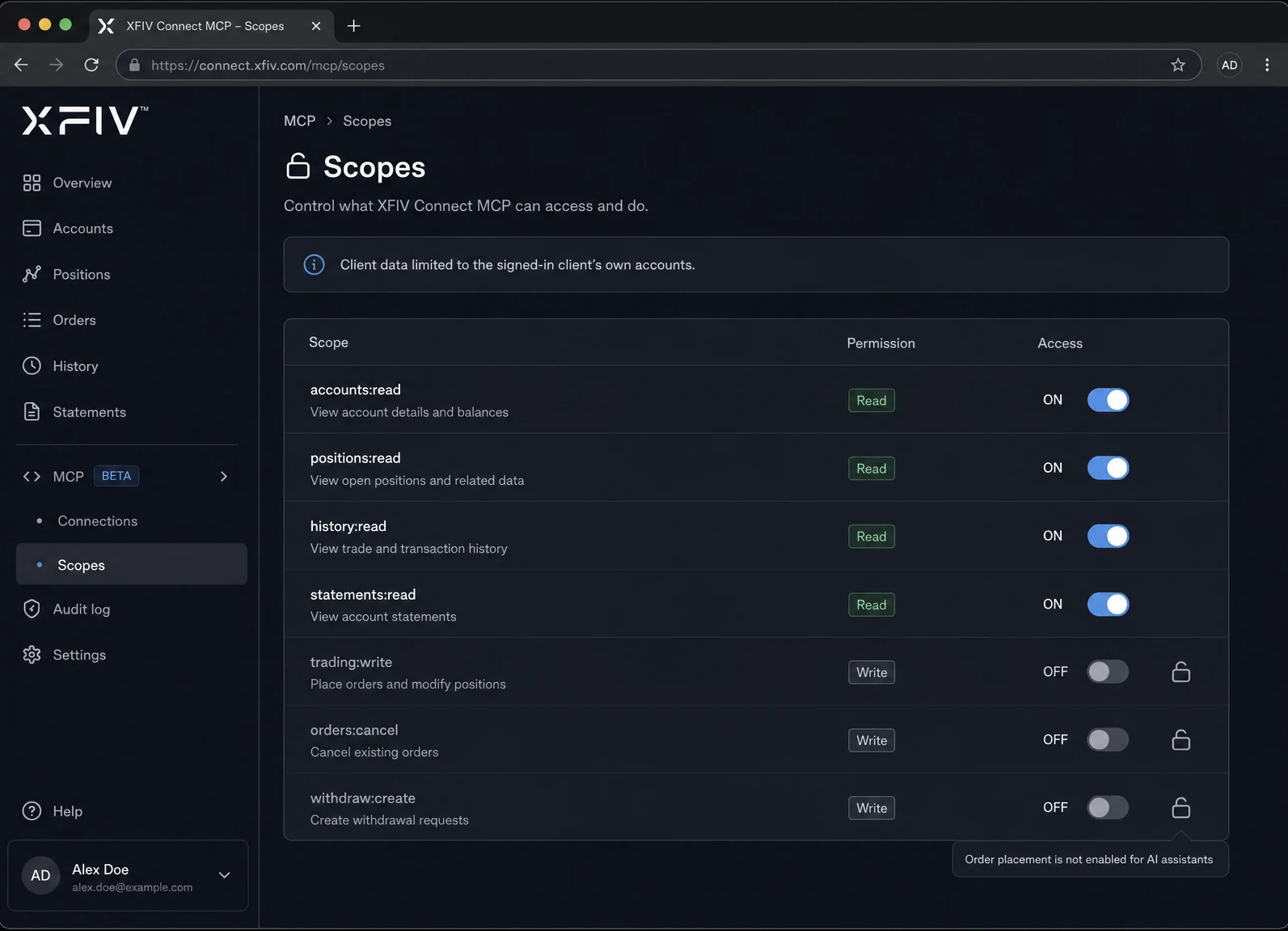
Scope list with read-only permissions switched on and trading permissions unavailable
Broker-set scopes

You decide what each assistant can see

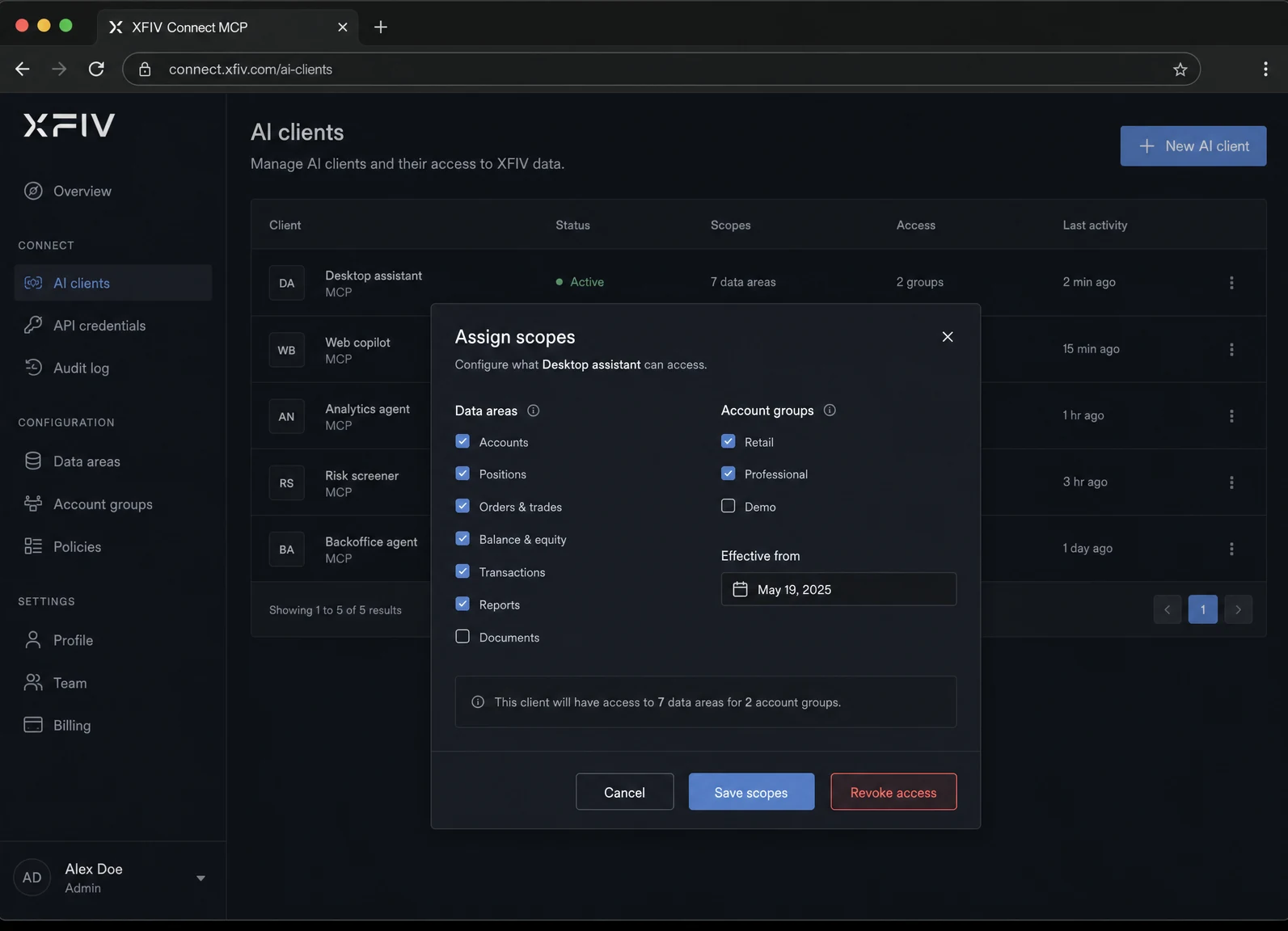
Scopes are set by the broker, not by the assistant. Choose which data areas are available, for which account groups and for which AI clients, and change them at any time.

  • Scopes per AI client
  • Scopes per account group
  • Revoke access in one place
Broker settings screen assigning data scopes to an AI client
Audit log

Every request is on the record

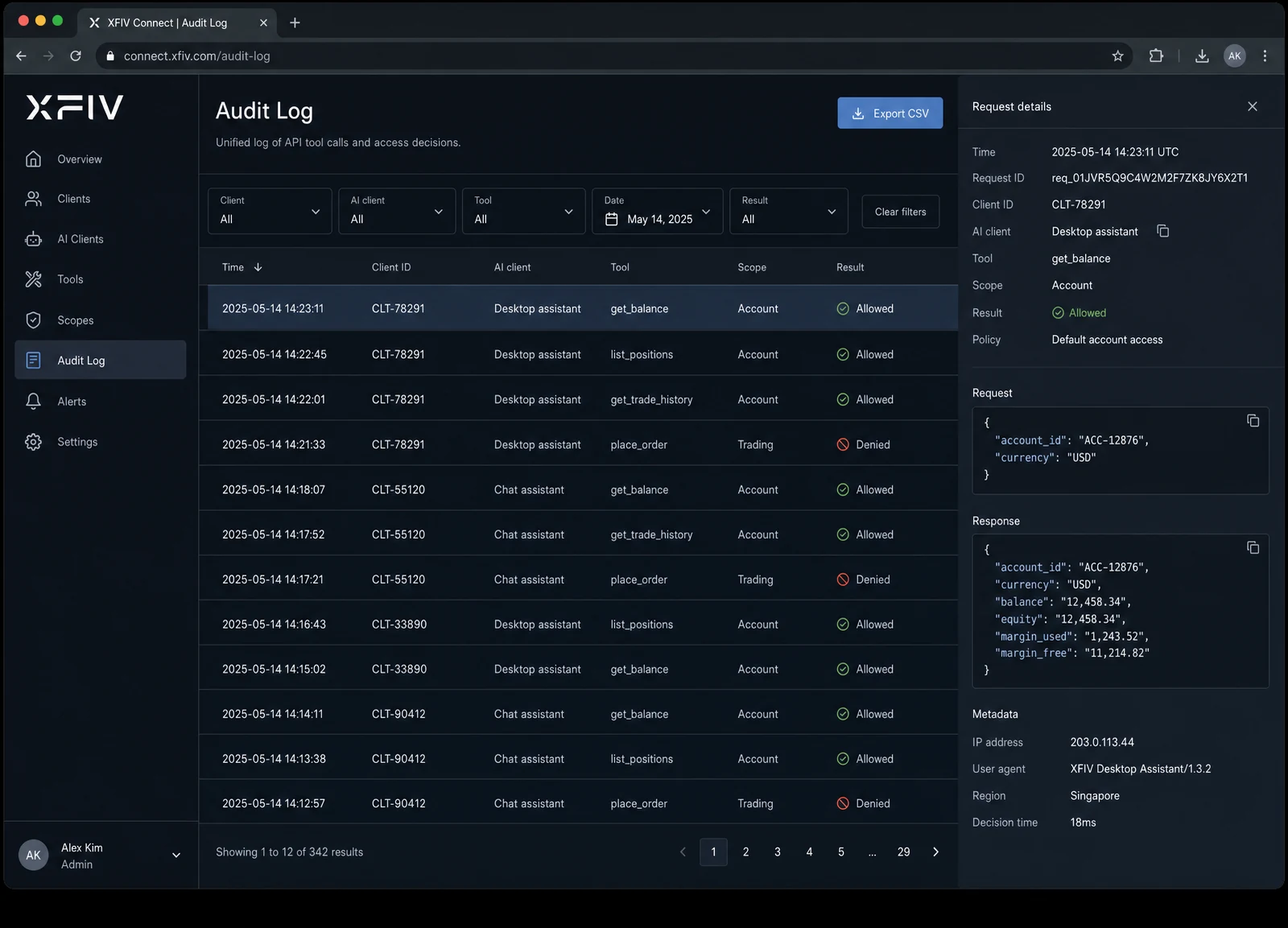
Each MCP request is written to the audit log with the client, the assistant, the tool called and the time. Your team can review activity, answer client questions and support compliance reviews.

  • One log for API and MCP calls
  • Filter by client or AI client
  • Export for reviews
Audit log table listing MCP requests by client, assistant and time
How it works

How a client connects an AI assistant

  1. The broker enables MCP

    You switch on the MCP layer in XFIV Connect, choose the AI clients you allow and set their scopes.

  2. The client connects

    From the client area, the client links a compatible AI assistant to their accounts and approves the access you allow.

  3. The client asks a question

    For example, "What is my open exposure on EURUSD?" The assistant picks an MCP tool to answer it.

  4. XFIV Connect checks the request

    The request is checked against the broker’s scopes and the client’s own accounts. Anything outside them is refused.

  5. Data is returned and logged

    Allowed data goes back to the assistant, and the request is written to the audit log.

  6. Access can be revoked

    The client or the broker can remove access at any time. Later requests are refused.

Comparison

Broker-side MCP and terminal-side AI in MT5

MetaTrader 5 added MCP support and a native AI assistant in build 6060, released July 23, 2026, with trading permission settings in the terminal. That is a useful tool for individual traders. Broker-side MCP in XFIV Connect solves a different problem: giving a brokerage control over AI access across all its clients.

QuestionXFIV Connect MCP (broker side)MT5 native AI assistant (terminal side)
Where it runsOn the broker side, through XFIV ConnectIn the trader’s MT5 terminal
Who sets permissionsThe broker, per AI client and account groupThe trader, in the terminal’s settings
Accounts coveredAll of a client’s accounts with the brokerThe accounts open in that terminal
TradingNot available to AI assistantsControlled by the terminal’s trading permission settings
Record of requestsCentral audit log the broker can reviewSee MetaQuotes documentation
Best forBrokers offering AI access to many clients under one policyIndividual traders using AI in their own terminal
Use cases

What clients ask through MCP

These are the kinds of questions a read-only, scoped MCP connection answers well.

01

Account summaries

"Summarize my balance, equity and margin across all my accounts."

02

Trading history

"Which symbols did I trade most last month, and what was my result on each?"

03

Open exposure

"What positions do I have open right now, and what is my floating P&L?"

04

Statements in plain language

"Explain the swap charges on my statement for last week."

Limits

What MCP in XFIV Connect does not do

It does not place, modify or close trades. It does not give investment advice; the assistant interprets data, and the broker remains responsible for how the service is offered to clients. It does not let one client read another client’s data, and it does not bypass the scopes you set.

XFIV is a brokerage technology provider, not a broker. Brokers decide whether to offer AI access, to whom, and under which terms, and should take their own legal advice on how that fits their obligations.

FAQ

Common questions

What is an MCP server for MT5?

It is a service that exposes MT5 account data to AI assistants through the Model Context Protocol. In XFIV Connect, it runs on the broker side, is read-only by default and logs every request.

Can an AI assistant place trades through XFIV Connect?

No. Order placement is not enabled for AI assistants. MCP access is for reading data within the scopes the broker sets.

Which AI assistants can connect?

Any assistant that supports MCP can technically connect, but only the AI clients the broker allows are accepted. The broker decides the list.

How is this different from the AI assistant in MetaTrader 5?

The MT5 assistant runs in the trader’s terminal with permissions the trader sets. XFIV Connect runs on the broker side, covers all of a client’s accounts and keeps one audit log under broker control. The two can coexist.

Who can see what an assistant requested?

Authorized broker staff can review the audit log, which records the client, the assistant, the tool called and the time of each request.

Is this financial advice?

No. MCP gives assistants access to data. XFIV does not provide investment advice, and brokers are responsible for how AI features are offered to their clients.

See MCP in XFIV Connect

Book a demo to see the permissions console, the audit log and a client connecting an assistant in the sandbox.

Last reviewed 2026-10-29