AI agent client portal

A client portal where clients can just ask

An AI agent client portal is a broker’s client area with an AI agent built in. Clients ask about their own accounts in plain language and get answers from real account data. In XFIV Portal, the agent gives information, not advice, reads only what the broker allows and hands over to staff when needed.

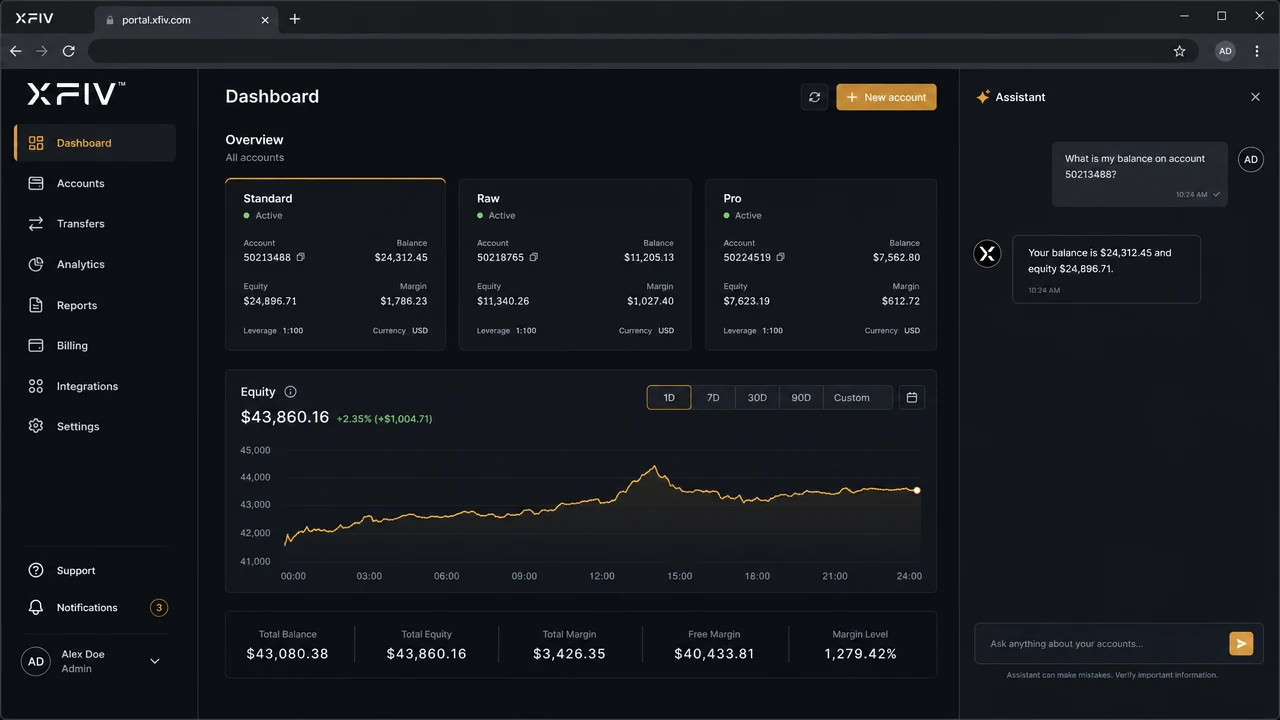
XFIV Portal client area with the AI agent answering a question about account balance
Definition

What is an AI agent client portal?

A client portal, also called a trader’s room or client area, is where a broker’s clients open accounts, manage funding, upload documents and review their trading. Most portals are a set of menus and tables. Clients who cannot find what they need open a support ticket.

An AI agent client portal adds an agent that understands the portal and can read the client’s own account data. Instead of searching through screens, the client asks: "Why is my margin level lower today?" or "Where do I upload my proof of address?" The agent looks up the relevant data, explains it in plain language and points the client to the right step.

The word "agent" matters. A simple chatbot matches questions to prepared answers. An agent works with live data and the portal’s own tasks, within limits set by the broker. That makes the answers specific to the client, and it makes guardrails essential.

An Agentic Client Portal

XFIV Portal includes an AI agent your clients can talk to. It answers account questions, explains history, guides them through next steps and hands off to your support team when needed.

Explore XFIV Portal
AI
Agent inside the portal
Read
Account-aware answers
Handoff
To your human support
Brand
Your name, your tone

The AI agent provides information, not investment advice.

Comparison

How an AI agent differs from a chatbot

Both sit in a chat window. What happens behind the window is different.

FAQ chatbotAI agent in XFIV Portal
Source of answersPre-written replies and help articlesThe client’s own account data plus portal knowledge
Example answer"You can check your balance under Accounts.""Your balance on account 1 is 4,210 USD. Equity is lower because of two open positions."
Multi-step helpLinks to articlesWalks the client through a portal task step by step
LanguagesUsually one script per languageAnswers in the client’s language
When it cannot helpShows a contact formHands the conversation to your support team with context
Data accessNoneOnly the data the broker allows, for the signed-in client
Information, not advice

The agent explains. It does not recommend.

The agent answers questions about the client’s account, statements and portal tasks. It does not tell clients what to trade, does not forecast markets and does not place trades.

  • No investment advice
  • No trade placement
  • Your own risk notices shown where you require them
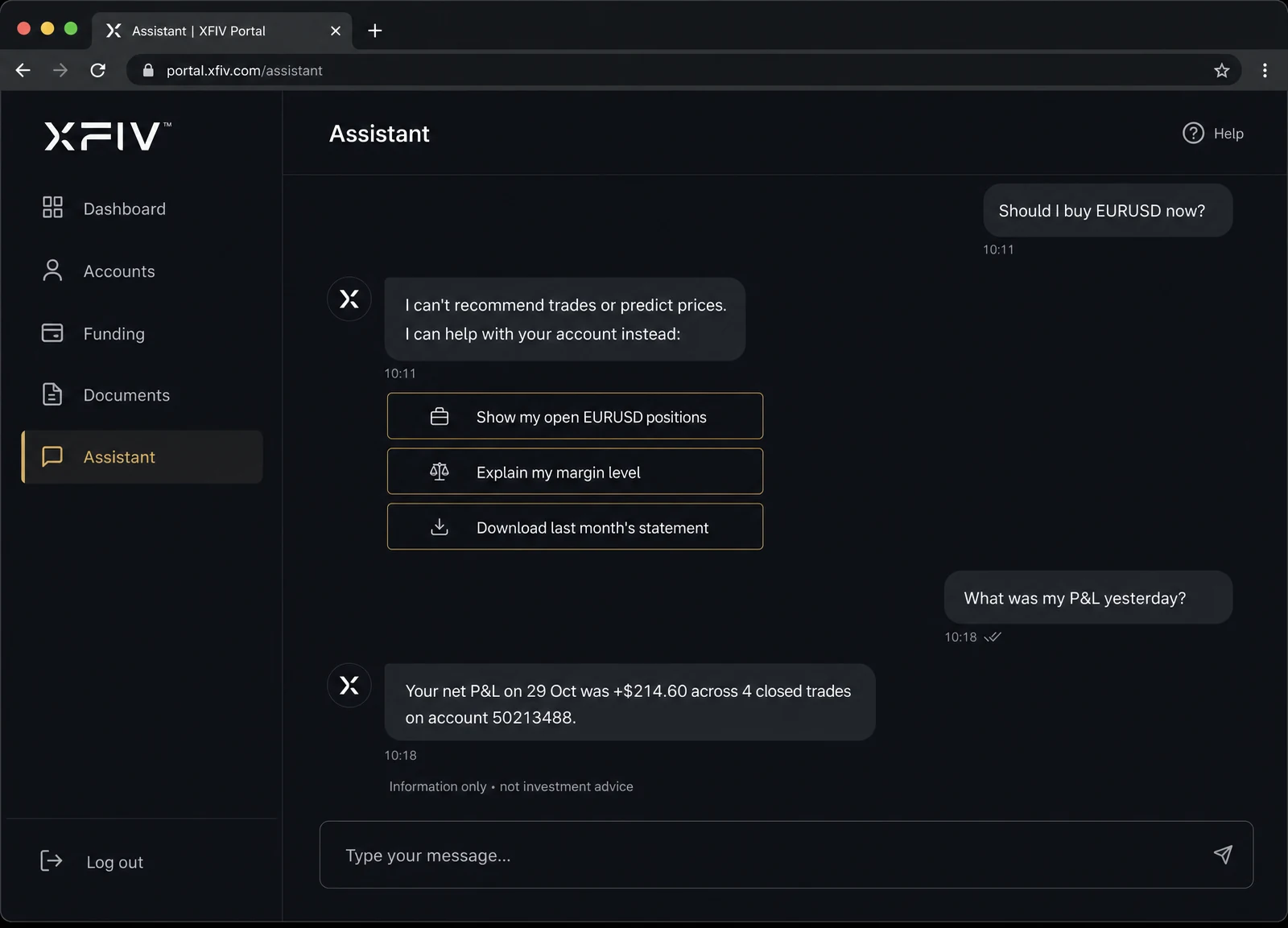
Agent reply declining to give a trade recommendation and offering account information instead
Broker-controlled data

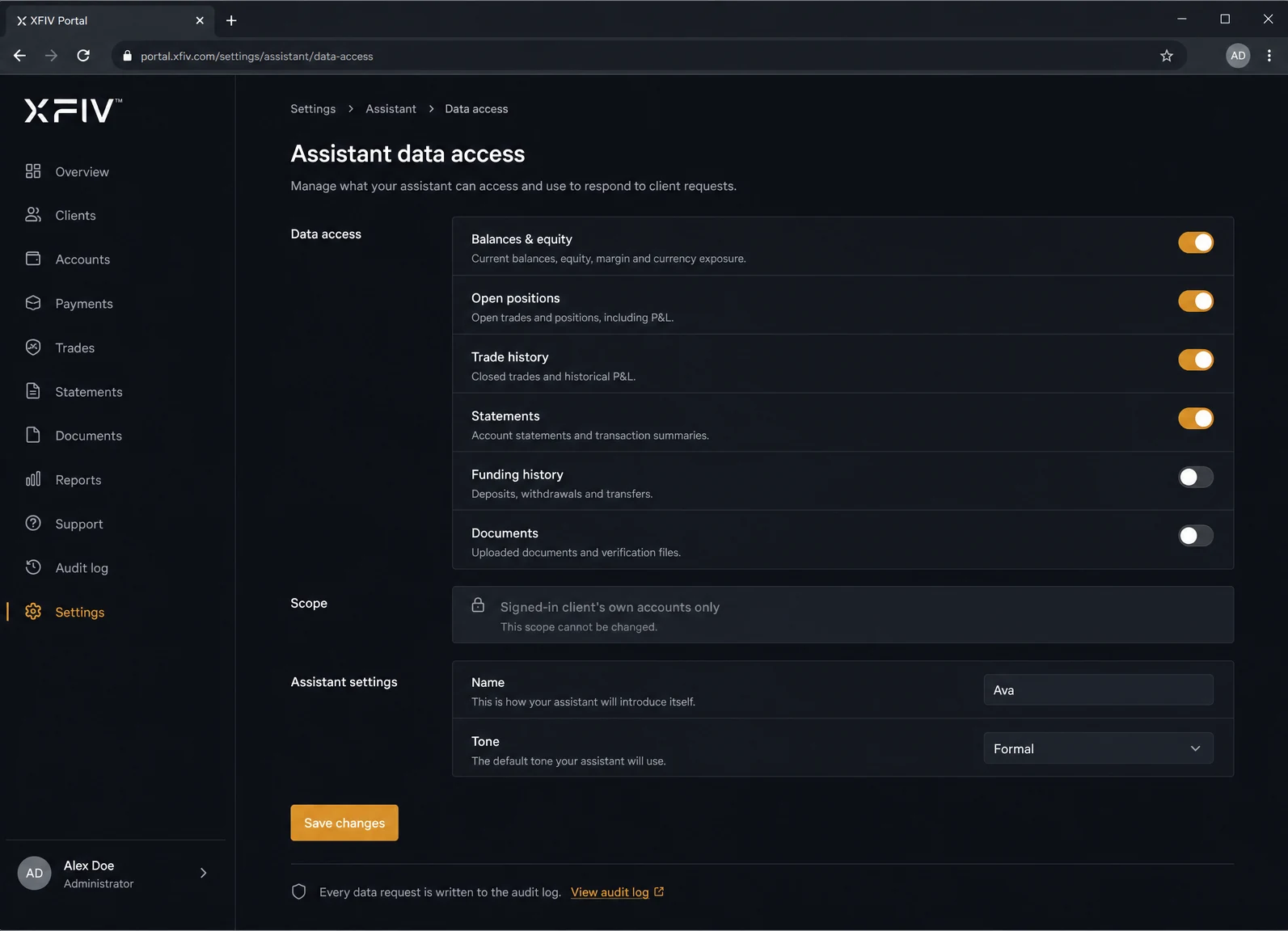
You decide what the agent can read

The agent works through XFIV Connect and sees only the data areas you enable, for the signed-in client only. Every data request is written to the audit log.

  • Data scopes set by the broker
  • Only the signed-in client’s accounts
  • Requests recorded in the audit log
Broker settings screen choosing which account data the AI agent can access
Human handoff

Your team steps in when it should

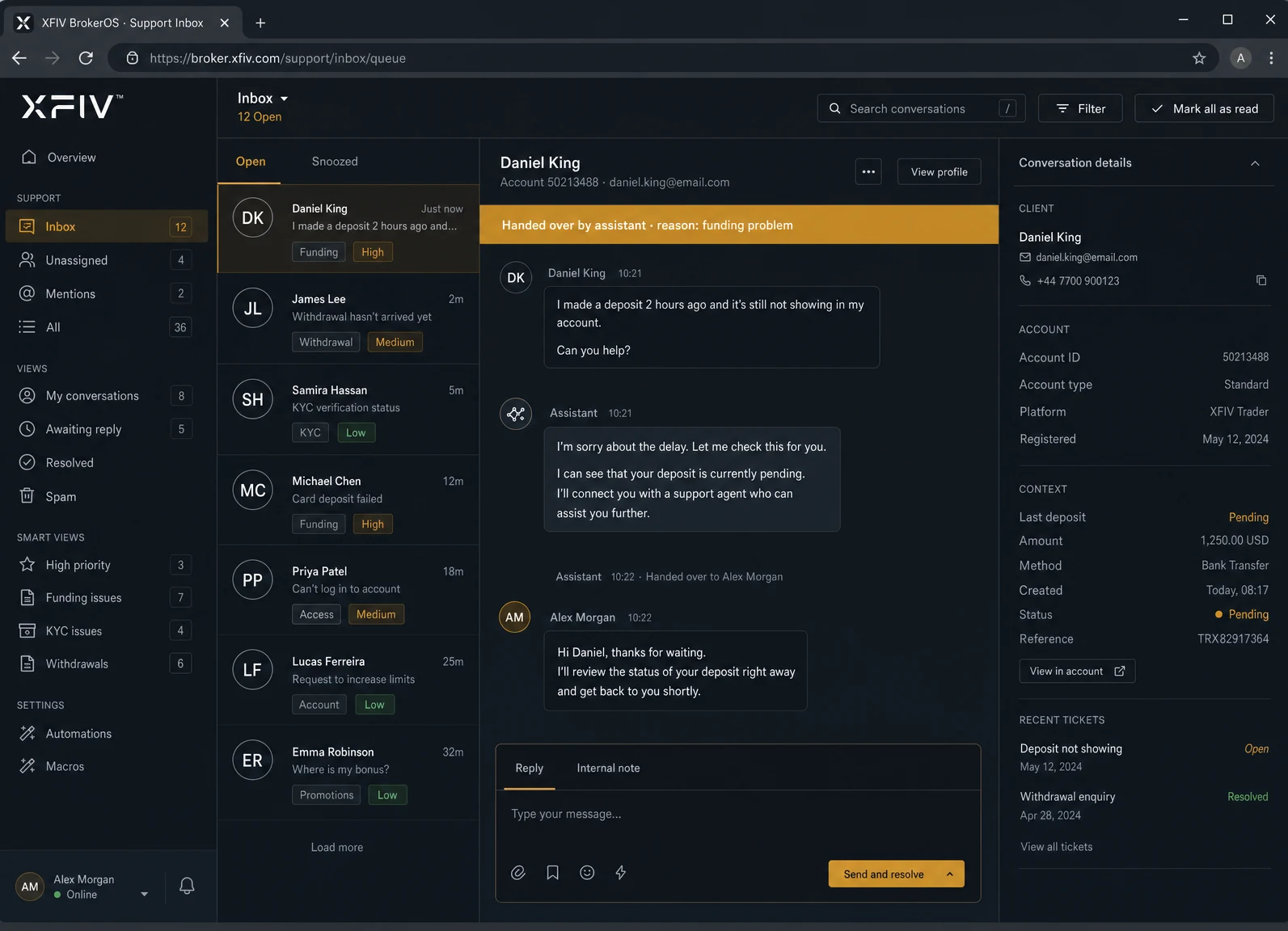
When a question needs a person, such as a complaint, a funding problem or anything outside its scope, the agent hands the conversation to your support staff with the context attached.

  • Handoff to support staff
  • Conversation history passed along
  • Clients can ask for a person at any time
Support agent view showing a conversation handed over from the AI agent
Scope

What the agent can and cannot do

Clear limits make the agent useful and keep it safe. These are the defaults; brokers can narrow them further.

01

Can: answer account questions

Balances, equity, margin, open positions and trading history for the signed-in client.

02

Can: explain statements

Swaps, commissions, deposits and withdrawals explained in plain language.

03

Can: guide portal tasks

Step-by-step help with account opening, document upload and funding requests.

04

Can: answer in many languages

Clients write in their language and the agent replies in the same one.

05

Cannot: give investment advice

No trade ideas, forecasts or suggestions about what to buy or sell.

06

Cannot: place or change trades

Trading stays in the terminal, under the client’s own control.

07

Cannot: see other clients

The agent only reads the accounts of the client who is signed in.

08

Cannot: approve funding

Deposits, withdrawals and document checks stay with your team and back office.

Guardrails

Why guardrails come first

An agent that reads real account data has to be designed around limits, not features. In XFIV Portal the limits are set by the broker and enforced outside the model: data access goes through XFIV Connect, which checks scopes and the signed-in client before anything reaches the agent. The model cannot ask for data the broker has not enabled.

Answers are framed as information. The agent describes what happened on an account and how the portal works. It does not say what a client should do next in the market. Brokers can add their own disclaimers and risk notices, and decide the agent’s name and tone.

XFIV provides the software. Brokers remain responsible for how AI features are offered to their clients and should take their own legal advice on how this fits their regulatory obligations.

Rollout

How brokers roll out the AI agent

  1. Connect MT5

    XFIV Connect links XFIV Portal to your MT5 server. Compatibility with your build is confirmed during onboarding.

  2. Set data scopes

    Choose which account data the agent can read. Start narrow and widen later.

  3. Configure the agent

    Set its name, tone, languages, disclaimers and handoff rules to match your brand and support hours.

  4. Test in the sandbox

    Ask the questions your clients ask, using sample accounts, and review the answers and audit log.

  5. Pilot with a small group

    Open the agent to a pilot group of clients and let your support team watch handoffs closely.

  6. Roll out and review

    Open it to all clients, then review logs and handoffs regularly to adjust scopes and rules.

Who it helps

What changes for your team and your clients

01

Clients

Answers about their own account at any hour, in their language, without searching through menus.

02

Support teams

Fewer repetitive questions, and handed-over conversations that arrive with context.

03

Compliance

A record of what the agent read and when, and limits enforced outside the model.

04

Management

A portal that feels current, without replacing MT5 or rebuilding the client area from scratch.

FAQ

Common questions

What is an AI agent client portal?

It is a broker’s client area with a built-in AI agent that reads the client’s own account data and answers questions in plain language, within limits the broker sets.

Does the AI agent give trading or investment advice?

No. The agent gives information about the client’s account and how to use the portal. It does not recommend trades, forecast markets or place orders.

Can the agent see other clients’ data?

No. The agent only reads the accounts of the signed-in client, and only the data areas the broker has enabled. Each request is recorded in the audit log.

What happens when the agent cannot answer?

It hands the conversation to your support staff with the conversation history attached. Clients can also ask for a person at any time.

Which languages does the agent support?

XFIV Portal has multi-language interfaces, and the agent replies in the language the client writes in. Confirm the languages you need during onboarding.

Do I need to replace my current portal or MT5?

You do not need to replace MT5. XFIV Portal runs on top of your MT5 server through XFIV Connect. Whether it replaces your current client area is your choice.

See the AI agent with sample data

Book a demo. We will show the agent answering real account questions in the sandbox, the scope settings and a handoff to support.

Last reviewed 2026-10-29