Why brokers need a permission model now
AI assistants no longer only chat. Through the Model Context Protocol (MCP), they can call tools and read data from other systems. MetaQuotes added MCP support and a native AI assistant to MetaTrader 5 in build 6060, released on July 23, 2026. Clients and staff will expect assistants to answer questions about accounts, positions and history.
An MCP server is a new door into your systems. The question is not whether to allow AI access at all. It is who gets in, what they can touch and how you know what happened. Those answers belong in a written permission model, agreed before the first connection goes live.
This guide is general design guidance, not legal or regulatory advice. Your obligations depend on your licence and jurisdiction, so involve your compliance team early.
Six principles
- Read-only by default. No tool that changes state is enabled unless there is a clear, reviewed reason.
- Broker-set scopes. The broker decides which tools exist and what each can reach. The assistant cannot widen its own access.
- Explicit consent. A person connects an assistant on purpose and sees what it will be able to read.
- Full audit. Every tool call is logged with who, what, when and the result.
- Instant revocation. The person and the broker can cut access at any time, and it takes effect on the next request.
- Data minimisation. Each tool returns the least data needed to answer the question.
Design scopes around questions, not tables
A common mistake is to expose the data model directly: one tool per database table, with broad filters. That makes the assistant powerful but hard to reason about. Instead, design tools around the questions people actually ask.
- “What is my balance and margin level?” becomes a tool that returns a short account summary.
- “Why was my position closed?” becomes a tool that returns one deal with its close reason.
- “What did I trade last week?” becomes a tool that returns history for a bounded date range.
Group tools into named scopes, such as account:read, history:read and documents:status. A connection gets a set of scopes, never raw access. Keep the list short. Each extra scope is something to review, test and explain.
Separate client scopes from staff scopes
A client’s assistant should only see that client’s data. A staff member’s assistant may see more, but it should follow the same role limits as the staff member in your back office. Never give an assistant more access than the person it acts for.
Keep write actions off
Reading data and changing data carry very different risk. A wrong answer can be corrected. A wrong trade, transfer or withdrawal may not be reversible. Language models can also misread instructions, and content they read may contain text meant to steer them.
For those reasons, the safest model keeps trading, funding and account changes outside MCP entirely. If you do decide to add a write tool later, treat it as a separate project: require a human confirmation step in your own interface, add per-action limits, and review it with compliance before release.
Make consent visible
Consent should be a clear step, not a side effect of logging in. When a client connects an assistant, show:
- Which assistant or application is asking to connect.
- The scopes requested, in plain language.
- That access is read-only.
- How long access lasts before it must be renewed.
- Where to see activity and how to disconnect.
Use short-lived tokens with refresh, so a forgotten connection does not stay open forever. Ask for consent again when the requested scopes change.
Log every request
An audit log is how you answer “what did the assistant see?” after the fact. For each tool call, record:
- Timestamp and request ID.
- The person and the connection (client or staff ID, application ID).
- The tool and scope used.
- The input parameters.
- Whether the call succeeded, was denied or failed.
- A reference to the data returned, or a summary, depending on your retention policy.
Make logs append-only and separate from the systems they describe. Give compliance and support a way to search them. Give clients a simple activity view for their own connections.
Make revocation instant
Revocation should work at three levels: one connection, one person and the whole MCP server. Check token validity on every request rather than caching it for long periods, so a revoked connection fails on its next call.
- Client level: a “disconnect” button in the client area.
- Staff level: support can revoke a client’s connections during an investigation.
- Broker level: a switch to disable a tool, a scope or the whole server.
Return less data
Data minimisation reduces the damage of any mistake. Return only the fields needed. Cap list sizes and date ranges. Mask identifiers where the full value is not needed. Do not return documents, payment details or identity data through MCP. If a question needs that data, the assistant should point the person to the client area instead.
A permission matrix you can adapt
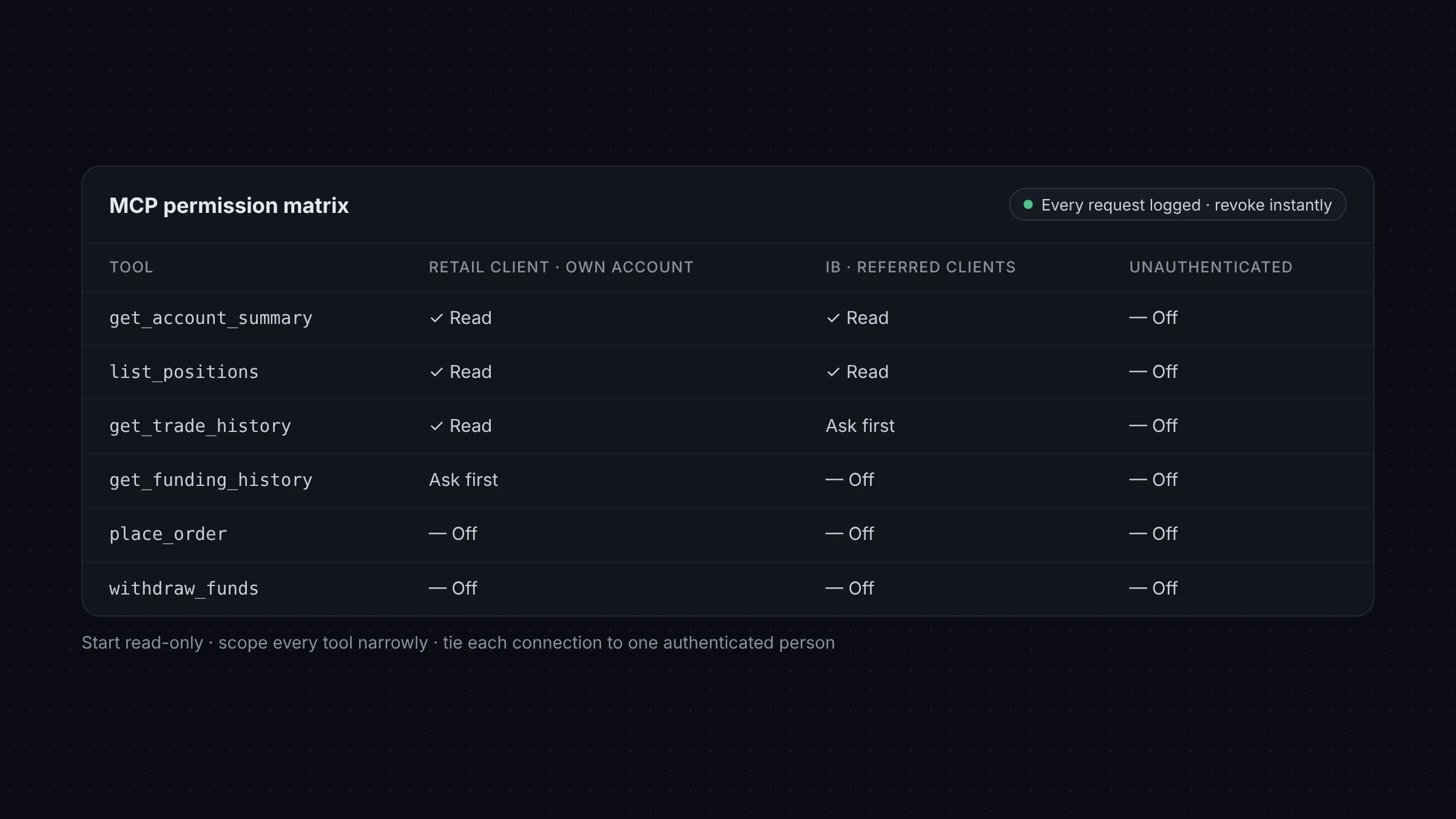
The table below is a starting point. Adjust it to your products, roles and rules.
| Capability | Client assistant | Support staff assistant | Default | Notes |
|---|---|---|---|---|
| Account summary (balance, equity, margin) | Own accounts only | Assigned clients | On | Read-only |
| Open positions | Own accounts only | Assigned clients | On | Read-only |
| Trade history | Own accounts, bounded range | Assigned clients, bounded range | On | Cap date range and rows |
| Document verification status | Own status only | Assigned clients | On | Status only, no files |
| Funding request status | Own requests | Assigned clients | Optional | No payment details |
| Identity documents and payment details | None | None | Off | Use the client area or back office |
| Place, modify or close trades | None | None | Off | Not exposed through MCP |
| Deposits, withdrawals, transfers | None | None | Off | Not exposed through MCP |
| Change account settings or leverage | None | None | Off | Requires a person in your own interface |
| Audit log of own connections | Own activity | Assigned clients | On | Visible to the person and to compliance |
Rollout steps
- Write down the questions you want assistants to answer, and drop anything that needs write access.
- Map each question to a tool, and group tools into scopes.
- Agree the matrix with compliance, security and support.
- Build and test in a sandbox with test accounts.
- Open access to staff first, then a small client pilot.
- Review the audit logs regularly and adjust scopes.
How XFIV applies this model
The MCP server in XFIV Connect follows the model above. It is read-only by default, scopes are set by the broker, every request is logged and the AI does not place trades. Brokers can test it in the XFIV sandbox before going live. See the MCP developer page for details.
Frequently asked questions
Should an AI assistant ever place trades for a client?
This guide recommends keeping trading and funding outside MCP. If a broker considers it, it should be a separate project with human confirmation, limits and a compliance review.
Who should set the scopes, the broker or the client?
The broker defines which scopes exist. The client chooses whether to grant them. The assistant should never be able to widen its own access.
How long should MCP access last?
Use short-lived tokens with refresh, and ask for consent again when scopes change or after a period you define.
What should be in an MCP audit log?
Who called which tool, when, with which inputs, through which connection, and whether it succeeded or was denied.